https://onnocenter.or.id/wiki/index.php?action=history&feed=atom&title=Python%3A_Gephi_StreamerPython: Gephi Streamer - Revision history2026-09-28T03:54:24ZRevision history for this page on the wikiMediaWiki 1.35.4https://onnocenter.or.id/wiki/index.php?title=Python:_Gephi_Streamer&diff=46635&oldid=prevOnnowpurbo: Created page with "Download GephiStreamer-2.0.3.zip Tools to stream data to gephi GephiStreamer ============= Python classes for streaming graph to gephi <br />
Install<br />
======<br />
<br />
`pip install gephistreamer`<br />
<br />
Quick use<br />
======<br />
<br />
```python<br />
# Basic import<br />
from gephistreamer import graph<br />
from gephistreamer import streamer<br />
<br />
# Create a Streamer<br />
# adapt if needed : streamer.GephiWS(hostname="localhost", port=8080, workspace="workspace0")<br />
# You can also use REST call with GephiREST (a little bit slower than Websocket)<br />
stream = streamer.Streamer(streamer.GephiWS())<br />
<br />
# Create a node with a custom_property<br />
node_a = graph.Node("A",custom_property=1)<br />
<br />
# Create a node and then add the custom_property<br />
node_b = graph.Node("B")<br />
node_b.property['custom_property']=2<br />
<br />
# Add the node to the stream<br />
# you can also do it one by one or via a list<br />
# l = [node_a,node_b]<br />
# stream.add_node(*l)<br />
stream.add_node(node_a,node_b)<br />
<br />
# Create edge<br />
# You can also use the id of the node : graph.Edge("A","B",custom_property="hello")<br />
edge_ab = graph.Edge(node_a,node_b,custom_property="hello")<br />
stream.add_edge(edge_ab)<br />
<br />
```<br />
How to<br />
=====<br />
<br />
Use the `Streamer` class to describe the action to perform:<br />
* add_node<br />
* change_node<br />
* delete_node<br />
* add_edge<br />
* change_edge<br />
* delete_edge<br />
<br />
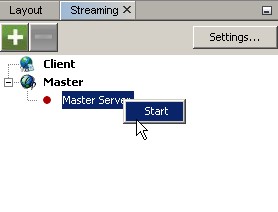
Don't forget to have Gephi running with the plugin [Graph Streaming](https://marketplace.gephi.org/plugin/graph-streaming/) installed and active in "Master mode".<br />
<br />
GephiWS<br />
=====<br />
<br />
The GephiWS class communicates with Gephi as Websocket call.<br />
<br />
GephiREST<br />
=====<br />
<br />
The GephiREST class communicates with Gephi as REST call.<br />
<br />
<br />
Auto commit<br />
=====<br />
By default, all action will trigger a "commit" and send information to Gephi. You still<br />
can use the old way by requiering a<br />
<br />
```python<br />
stream = streamer.Streamer(streamer.GephiREST(),auto_commit=False)<br />
[.. actions ..]<br />
stream.commit() # Will send all actions buffered to Gephi<br />
``` <br />
<br />
<br />
==Referensi==<br />
<br />
* https://pypi.python.org/pypi/GephiStreamer</div>Onnowpurbo